


What Is OpenClaw? The Autonomous AI Agent Explained (2026 Guide)
Artificial intelligence is evolving rapidly. Traditional chatbots can answer questions, but the next generation of AI goes much further. Instead of simply responding to prompts, modern AI systems can perform tasks, automate workflows, and operate software independently.
One of the most exciting technologies in this space is OpenClaw, an open-source autonomous AI agent designed to automate real work across apps, files, and online services.
In this guide you’ll learn:
-
What OpenClaw is
-
How OpenClaw AI agents work
-
Real-world use cases for autonomous AI
-
How to run OpenClaw locally
-
The best hardware for running AI agents
What Is OpenClaw?
OpenClaw is an open-source AI agent framework that connects large language models with automation tools to perform tasks autonomously.
Unlike traditional chatbots that only generate text responses, OpenClaw agents can:
-
interact with software
-
automate workflows
-
browse the internet
-
run scripts and commands
-
manage data and files
An OpenClaw agent behaves more like a digital assistant capable of executing multi-step actions, rather than just answering questions.
This is why OpenClaw is often described as part of the autonomous AI agent revolution.
OpenClaw Architecture Overview

Suggested Alt text for SEO:
-
openclaw-ai-agent-architecture-diagram -
how-openclaw-autonomous-agent-works -
openclaw-agent-system-design
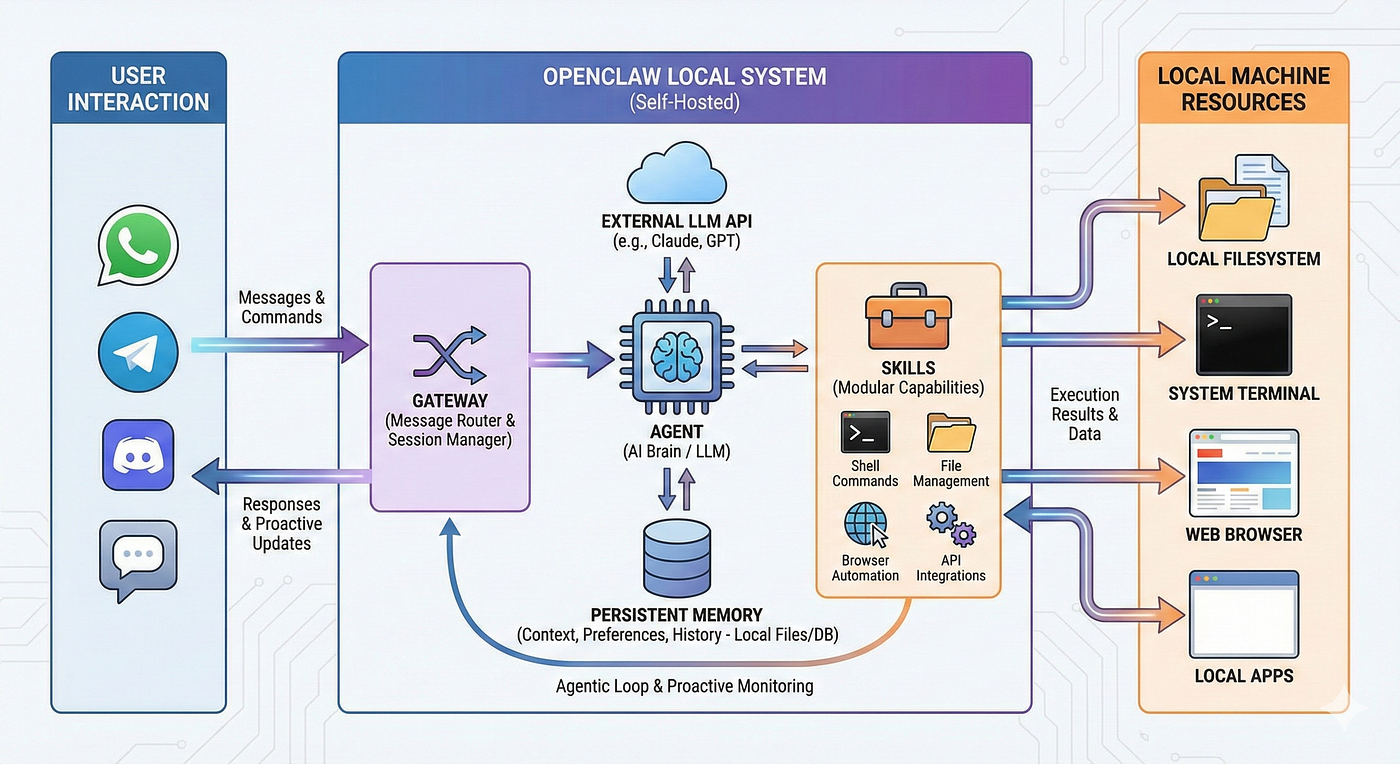
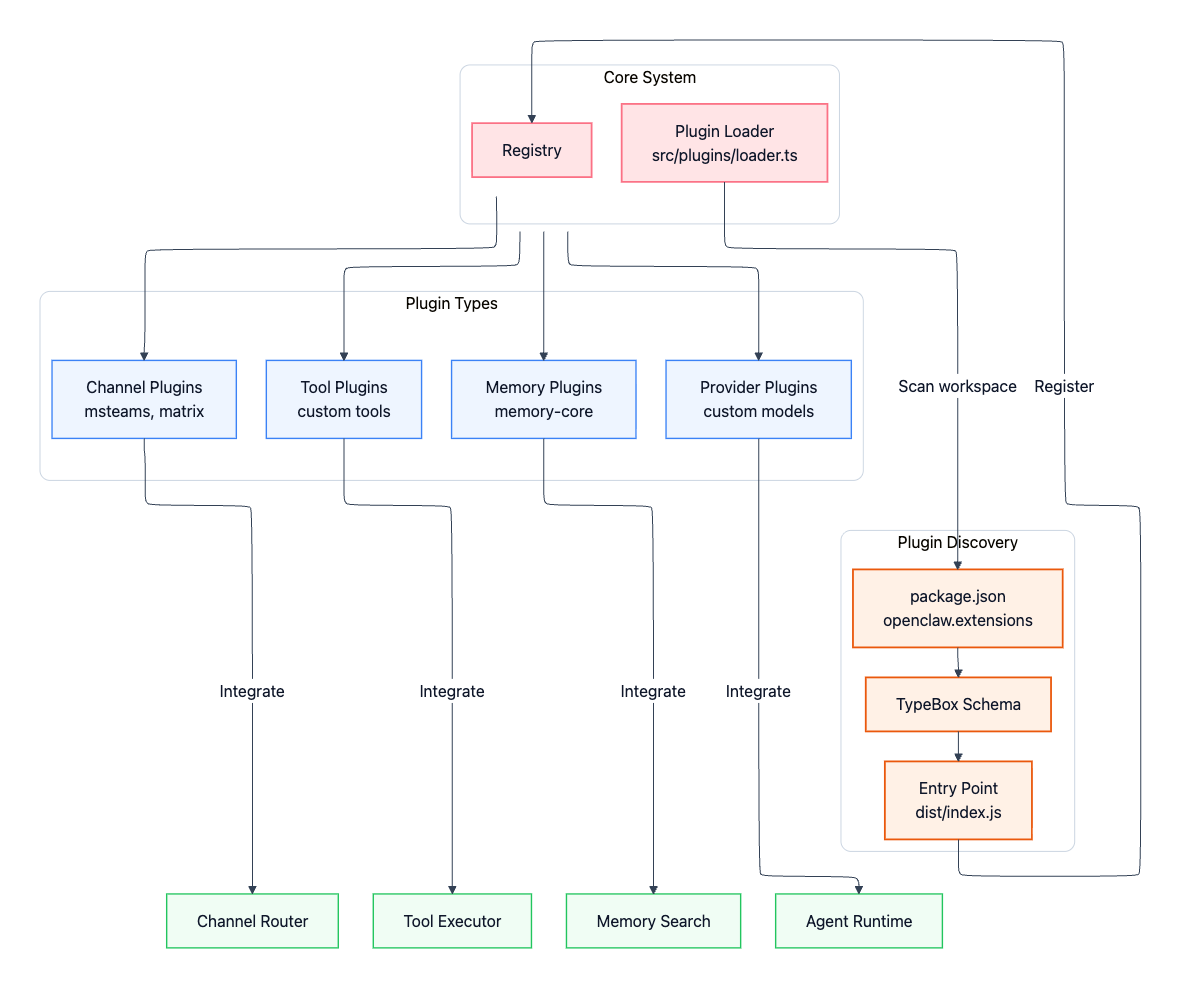
The architecture of OpenClaw connects multiple components that allow AI to reason, plan, and execute tasks automatically.
At a high level, OpenClaw works through a system that includes:
-
a gateway control layer that manages communication
-
a reasoning engine powered by language models
-
a memory system storing context and knowledge
-
tools and plugins that execute actions
This architecture allows OpenClaw agents to process requests in a continuous loop:
Receive request → analyze goal → choose tools → execute task → store memory.
How OpenClaw AI Agents Work
OpenClaw agents are designed with multiple layers that enable autonomous decision-making.
1. Model Layer
The model layer uses large language models to analyze tasks and generate action plans.
The AI determines:
-
what the user wants
-
which tools should be used
-
how to complete the task
2. Memory Layer
Unlike simple chatbots, OpenClaw agents store information across sessions.
This allows the AI to:
-
remember past interactions
-
track ongoing tasks
-
improve workflow continuity
3. Tool Layer
Tools are what enable OpenClaw agents to perform real actions.
Examples include:
-
web browsing tools
-
file management tools
-
API integrations
-
code execution tools
These tools turn OpenClaw into a functional automation platform rather than just a conversational AI.
Why OpenClaw Is Different From Chatbots
Most AI assistants today are reactive systems.
OpenClaw belongs to a new category called agentic AI.
| Feature | Chatbots | OpenClaw |
|---|---|---|
| Text responses | ✔ | ✔ |
| Multi-step reasoning | Limited | ✔ |
| Automation | Limited | ✔ |
| Persistent memory | Rare | ✔ |
| Continuous operation | No | ✔ |
This ability to take actions autonomously is why AI agents are considered one of the most important trends in artificial intelligence.
Real-World Use Cases for OpenClaw
Autonomous AI agents can automate many tasks that normally require manual work.
AI Workflow Automation
OpenClaw can automate repetitive tasks such as:
-
collecting online data
-
generating reports
-
managing digital workflows
Personal AI Assistants
Developers often use OpenClaw to build custom AI assistants that can:
-
manage calendars
-
organize files
-
summarize documents
-
send notifications
Developer Productivity
OpenClaw agents can assist with:
-
code generation
-
repository monitoring
-
software deployment automation
Business Automation
Companies are experimenting with OpenClaw to automate internal processes such as:
-
data processing
-
operations management
-
customer service workflows
Running OpenClaw Locally
Many developers choose to run OpenClaw locally rather than fully relying on cloud infrastructure.
Benefits include:
Better Privacy
Local deployment keeps sensitive data on your own machine.
Lower Cost
Running AI agents locally reduces cloud API costs over time.
Faster Performance
Local hardware allows faster task execution and reduced latency.
Recommended Hardware for Running OpenClaw
Running autonomous AI agents requires reliable computing power.
A powerful compact workstation like the ALLIWAVA GH8 Mini PC Ryzen 9 8945Hs 32GB DDR5 1TB NVMe SSD provides an ideal environment for local AI automation.
Why This Mini PC Works Well for AI Agents
Ryzen 9 8945HS Processor
High-performance CPU cores handle AI reasoning tasks efficiently.
32GB DDR5 RAM
Large memory capacity allows multiple AI tools and containers to run simultaneously.
1TB NVMe SSD
Fast storage ensures smooth performance when managing logs, datasets, and agent memory.
Compact Workstation Design
Mini PCs deliver desktop-level performance while saving space, making them ideal for:
-
AI development labs
-
home servers
-
automation environments
How to Install OpenClaw
Basic setup steps usually include:
-
Install Docker or runtime dependencies
-
Download the OpenClaw repository
-
Configure AI model APIs
-
Install automation tools and plugins
Once installed, the AI agent runs continuously in the background.
The Future of Autonomous AI Agents
AI technology is moving toward systems that act independently instead of only generating content.
Autonomous agents like OpenClaw could soon power:
-
AI digital workers
-
automated research systems
-
intelligent software operations
As hardware becomes more powerful and affordable, running advanced AI agents locally will become increasingly common.
Devices such as the ALLIWAVA GH8 Mini PC Ryzen 9 8945Hs 32GB DDR5 1TB NVMe SSD make it possible to build a personal AI workstation capable of supporting these systems.
FAQ About OpenClaw
What is OpenClaw?
OpenClaw is an open-source autonomous AI agent that can perform tasks such as automation, file management, web browsing, and API interactions.
Is OpenClaw free?
Yes. OpenClaw is open-source software and can be installed locally or customized by developers.
Can OpenClaw run on a local computer?
Yes. Many developers run OpenClaw on local machines or mini PCs to improve privacy and reduce cloud costs.
What hardware is recommended for OpenClaw?
Systems with strong CPUs and large memory are recommended. Devices like the ALLIWAVA GH8 Mini PC Ryzen 9 8945Hs 32GB DDR5 1TB NVMe SSD provide enough power for AI automation workloads.
Final Thoughts
OpenClaw represents a major step forward in AI technology.
Instead of just generating responses, AI agents can now:
-
automate tasks
-
interact with software
-
perform complex workflows
As the autonomous AI ecosystem continues to grow, tools like OpenClaw will likely become a core part of the next generation of intelligent software.
And with powerful compact hardware like the ALLIWAVA GH8 Mini PC Ryzen 9 8945Hs 32GB DDR5 1TB NVMe SSD, building your own AI automation environment is easier than ever.


